Introduction to the Curriculum and General Information
You and Me N.I. Vape Free is a teacher's resource to assist with educating young people on the dangers of vaping. It has been adapted specifically for Northern Ireland by Stanford University and Northern Ireland Chest Heart and Stroke.
The You and Me, N.I. Vape-Free curriculum has been adapted for both Primary School and Post Primary School Children.
- The Primary School programme includes 2 lessons
- There are two separate programmes for Year 8-10 and Year 11-14 pupils that are 6 lessons each.
Every lesson provides activities, online quiz games, and worksheets in addition to presentations, resources, and other materials aimed at addressing key factors associated with youth e-cigarette use.
These include areas like:
- changing adolescents’ attitudes towards and misperceptions about e-cigarettes;
- increasing their refusal skills to pulls of flavors, marketing, and social media;
- reducing stress and depression which have been linked to e-cigarette initiation and use;
- improving coping;
- and decreasing intentions and actual use of all e-cigarette products.
The goals of this curriculum are for adolescents to:
Increase their knowledge about e-cigarettes and the harms they can cause.
Gain awareness of strategies manufacturers & sellers of e-cigarettes use to increase use among adolescents, such as deceptive and creative marketing.
Gain skills to refuse experimentation and use of e-cigarettes.
Ultimately, to reduce and prevent e-cigarette use of any type, including nicotine, cannabis/THC, and/or non-nicotine products.
Before getting started, here are a few notes to review:
- Each lesson has a lesson page that provides background information, learning objectives, and key takeaways the students will learn. Each lesson also includes direct links to the Canva slides, talking points, a Kahoot quiz, and a Discussion Guide.
- All lessons may require some prep work for activities (gathering materials, setting up the class), optional slides (preview optional videos and activities to see if they are right for your class), and determining additional activities (found at the bottom of each lesson page). Please review each lesson's notes before implementing.
- Notes (a.k.a. "script") that can be used for each slide are embedded in the Canva slides as well as can be found in the teacher Talking Points Chart.
- Each unit has a Kahoot! Quiz linked below and can be used as a pre and post quiz to see how much students know before and after instruction.
Guide To Using The Curriculum:
-
In order to create new, more animated and more exciting slides, we are using Canva slides for each lesson.
We would like to encourage you to set up your free Canva Pro account! Link here for educators to set up their free account.
Educators who have a free or pro account with Canva will be able to:
- See the slides and talking points in the notes section.
- Make a copy and save slides to add personal adjustments.
- Share the slides with anyone who has or doesn't have a Canva account.
- Download the slides as PDF, PowerPoint or Video (depending on if the lesson includes videos).
To download your Canva presentation in PowerPoint format:
At the bottom of each lesson page there is a link to download the presentation and Kahoot files in Powerpoint and Word format. Alternatively you can also follow the steps below to download a Canva presentation in PowerPoint format:
- Navigate to the lesson on our website you would like to download.
- Click the "Click to make a copy on Canva" button to open the presentation
- Click the "Share" button in the top right corner.
- Click the "Download Button" & change the file type to Microsoft PowerPoint (PPTX).
- Click "Download"
Educators who want to download slides and import them into google slides please read the following:
- Import Canva presentations in Google Slides, download the Canva slides as a PowerPoint presentation or as png files.
- Convert your PowerPoint into Google Slides or drag and drop your png images into Google Slides.
- Stretch each one across each of your slides and add animations if needed.
Educators who don't have a free or pro account with Canva:
Will be able to view the slides without accessing the talking points in Canva, in which case you'll still have access to download the Talking Points using the button on each lesson page on our website. We suggest teachers at least create a free account to have better accessibility to the slides.
-
Before diving into the lessons, we suggest a couple of warm-up activities with your students!
Warm-up Activity 1

- E-cigarettes have many different names: e-cigs, vapes, vape pens, Juul and so on.
- Ask students to shout out different names, but then explain that this curriculum will use the term e-cigarettes as they are a form of cigarettes and not a water vapor.
- Alternatively, have students quietly write down different names for e-cigarettes and where they have seen them.
Warm-up Activity 2

- Ask students to shout out what they know and what they want to know about e-cigarettes. Consider writing down what the students say, on paper, a white board, or a slide - whatever you prefer. Then, at the end of the curriculum, review what was said before and what was covered, and correct misperceptions.
- Alternatively, have students quietly write down what they know about e-cigarettes and what they want to know.
-
Pre-Survey
(BEFORE you teach any of the lessons)
Click the image below, right click to save on your computer to give to your students. Or simply give them the link below the QR code!
QR CODE
Post-Survey
(AFTER you teach any number of the lessons)
Click the image below, right click to save on your computer to give to your students. Or simply give them the link below the QR code!
QR CODE
-
If you would like to send a letter home to parents regarding this curriculum, please preview and download/print below.
-
Learn more about addiction, the brain, nicotine, etc.
Crash Courses are concise summaries of the key topics in the curriculum. These are perfect for a range of audiences: educators teaching tobacco/nicotine prevention for the first time or those wanting more information.
-
Vaping addiction soon takes hold of you - poster for young people (male) - Vaping addiction soon takes hold of you - poster for young people (male) | HSC Public Health Agency
Vaping addiction soon takes hold of you - poster for young people (female) - https://www.publichealth.hscni.net/publications/vaping-addiction-soon-takes-hold-you-poster-young-people-female
Vaping factsheet - Vaping factsheet | HSC Public Health Agency
Behavioural insights into youth vaping in Northern Ireland report – Youth vaping in NI
-
Quitting Tips for Nicotine | Halpern-Felsher REACH Lab | Stanford Medicine
Nicotine Pocket Guide.pdf - Google Drive
Risks-Of-E-Cigs-Infographic-11x17.pdf - Google Drive
Environmental-Infographic-R4-11x17.pdf - Google Drive
High-School-Vaping-Cannabis-Infographic.pdf - Google Drive
Vaping Infographic (Adult Facing).pdf - Google Drive
High-School-Vaping-Cannabis-Infographic.pdf - Google Drive
Cannabis-Side-Effects-Infographic-R4-11x17.pdf - Google Drive
Dabbing-Middle-School-Cannabis-Infographic-11x17.pdf - Google Drive
-
Talking to teens about substance use is hard — but how we talk to them matters.
Developed by the Stanford REACH Lab and the Stanford Center for Health Education, this free 10-lesson course teaches adults how to move beyond scare tactics and "just say no." Instead, learn how to build trust and have honest, two-way conversations that actually make a difference.
Designed for educators, parents, coaches, counsellors, and anyone who supports youth aged 11–19.
Some skills you will learn during this course include the following:
Recognise signs of substance use
Use motivational interviewing
Support teens in cutting back or quitting
Personalise your approach using evidence-based tool
Find out more: Educational Videos | Halpern-Felsher REACH Lab | Stanford Medicine
Resources
Download our NICHS Vaping Posters and Leaflet:
-
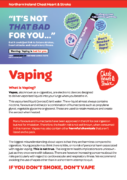 Vaping Information LeafletDownload pdf
 -
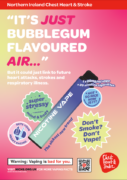 Vaping A4 Poster - "It's just bubblegum flavoured air..."Download pdf
 -
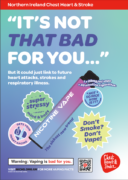 Vaping A4 Poster - "It's not that bad for you..."Download pdf